
Trivia: AFI_Get_the_Picture_Trivia.zip
- Views 765
- Created
- Last Reply
Posted Images
Featured Replies
Topics
-
THX - Sphere THX Sphere Trailer in 4K with 7.1 Audio in Dolby TrueHD and Dolby Digital Plus (secondary track). File Information Submitter ToastyMaster07 Submitted 04/07/2026 Category Audio Format View File
-
Announcing the release of Kodi 22 “Piers” Alpha 3! Usual words - the step from 21 to 22 is a major release, but it’s also an Alpha at this stage, so you’re going to get some bugs as well as funky new features. That is, of course, a major part of the point of early release software: please raise Github issues with full debug logs to help us resolve any regressions you wonderful testers come across. Okay, what’s new in this version? Changelog Release highlights Added support for taglines in
-
So, here we are, back in the roo atm after a day of sidebar meetings, coding, hacking, experimenting, and general conferencing. Time for some more structured sessions, starting with some of our partner projects. Chewitt started us off with an overview of LibreELEC: hardware updates and changes, new chip set support, some challenges with older SoCs, plans for standardising e.g. kernel trees more, and so on. He also covered topics such as the challenges around supporting set-top box DVB tuners, p
-
Well, hello everyone! It’s that time of year again, when your favourite development team rouse themselves from their long winter slumber and emerge, blinking in the light, to reconnect with their fellow creatures. Welcome to DevCon 2026! We’re coming to you this year from about an hour outside Barcelona, which makes this a return visit. Not that it matters, I guess; you probably know how this works by now, so let’s get straight in … As seems to be tradition now, we kicked off with a round of r
-
Currently working out a series of videos for theater intros. Using Unreal Engine. Slow going but I hope to make one for every genre. At least I have one. I customized the Regal Cinemas 1990's roller coaster to my theater. Used some AI to change some wording in the narration and Davinci resolve to edit the text on the marque scroller. Gruelling work as unreal Engine is hard to learn. Nothing is straight forward. Everything is a task. But I hope in the end it looks great. Doing an old West town





AFI_Get_the_Picture_Trivia.zip
A collection of trivia slides pulled from the AFI Get the Picture daily quizzes at https://www.afi.com/get-the-picture/
These represent the quizzes from #1000-1150. There are 3 slides for each movie:
AFI_Get_the_Picture_Trivia_Question1_q.jpg --> Question slide with screenshot and 5 options for movie title
AFI_Get_the_Picture_Trivia_Question1_c1.jpg --> Clue/answer slide with highlighted correct answer
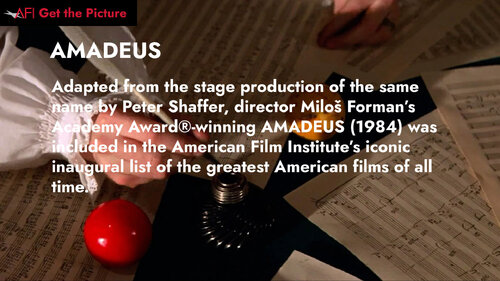
AFI_Get_the_Picture_Trivia_Question1_a.jpg --> Answer/fact slide with correct title and some info about the movie
I wasn't sure how PSE handles the fact slides and so named them as above. Should be pretty easy to rename if you want to organize them differently. I used a script to generate the slides, but tried to check them all before uploading. Let me know if you notice any formatting issues etc.
File Information
Submitter MoneyRussell
Submitted 06/03/2025
Category Trivia
View File